


How to Use the [Media] Hub
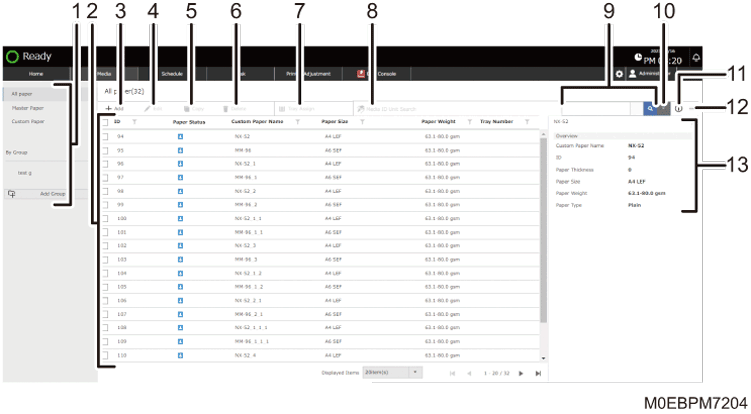
[All Paper], [Master Paper], [Custom Paper], [By Group]
Press one of these when managing paper.
[All Paper]: Press this to display all Master Paper and Custom Paper.
[Master Paper]: Press this to display all Master paper.
[Custom Paper]: Press this to display the Custom Paper that is registered on the machine.
[By Group]: Press this to manage Custom Paper by assigning them to Group. Press the name of a group to display the Custom Paper that is registered under the group.
List of Paper
Displays the list. To sort the displayed items, press the column title.
To select paper, select the check box at the start of the line. Select the check box in the column title to select all paper that is displayed in the list.
The "Paper Status" icons have the followings meanings:
 : Master Paper
 : A registered Custom Paper based on a Master Paper
 : A registered Custom Paper based on a Master Paper with edited settings
 : A newly created Custom Paper
[Add]
Press this to add a new paper setting.
[Edit]
To edit a registered paper setting, select the check box of the paper, and then press this button.
[Copy]
To duplicate a registered paper setting, select the check box of the paper in the paper list, and then press this button.
Selecting the Paper's Name from the Master Paper
Registering a New Custom Paper by Modifying an Existing Paper
[Delete]
To delete a registered paper setting, select the check box of the paper in the paper list, and then press this button.
Registering a New Custom Paper by Modifying an Existing Paper
[Tray Assign]
To assign a paper tray to paper, select the check box of the paper in the paper list, and press this button.
[Media ID Unit Search]
Press this when you specify the custom paper on the paper tray using the media identification reader.
Search (
 )
)To search for paper, enter the search string in the input box, and then press
.Advanced search (
 )
)When you are searching for paper by its Manufacturer, Paper Weight, or other paper attributes, specify the search details, and then press
.Show Info (
 )
)Press this to display the summary information of the specified paper.
Others (
 )
)[Arrange Columns]: Press this to change the column title displayed in the paper list.
[Output Paper List]: Press this to output the list of paper settings.
[Import]: Press this to import a paper setting.
[Export]: Press this to export the paper setting that is selected in the list.
Paper Summary Information
When you press a line of paper in the paper list, "Custom Paper Name", "ID", "Paper Thickness", "Paper Size", "Paper Weight", and "Paper Type" of the selected paper are displayed. You can also see the information that you specified not to display in [Manage Columns]. To hide the information, press
 .
.