


Overview of Paper Settings
[Media] hub
You need to specify the paper sizes and types for paper trays in order to properly print on the paper loaded in the paper trays. You can configure these settings in the [Media] hub.
Master Paper
In Master Paper, the information including the paper type, weight, and detailed operating conditions of the machine suitable for the paper is registered and categorized by typical paper stocks and common paper types available on the market.
Download the setting file for Master Paper from the manufacturer’s website, and then import it onto the machine to use it.
To use the settings in the master paper, you must first select the name or type of your paper from the master paper. The paper settings will be registered to a custom paper. The master paper makes it easy to get the best results from your paper.
Custom Paper
You can register the paper type, weight, and detailed operating conditions of the machine suitable for the paper independently per paper stock that you use as a Custom Paper.
This function is convenient because you can register certain types of paper that you often use as custom paper.
Custom Paper can also be set from the master paper.
The machine automatically synchronizes the custom paper settings with the media catalog information on the color controller.
Use any of the procedures described below to register a Custom Paper.
Select the paper's name or type from the master paper
Modify a custom paper that has already been registered
Manually specify the paper's type and weight
Under the custom paper's advanced settings, you can specify the machine operating conditions, toner transfer, and toner fusing conditions. The master paper contains the advanced settings that are preconfigured so that you do not need to configure them.
Types of Paper Settings
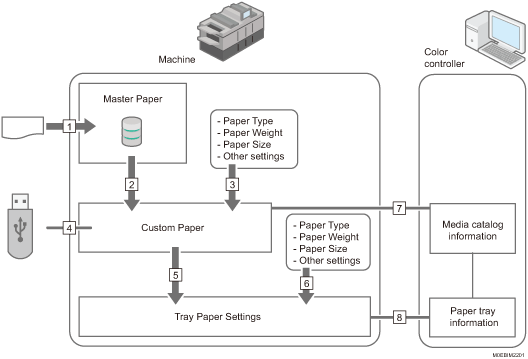
From the setting file, import the settings for Master Paper.
You can register the settings stored in the master paper to a custom paper.
You can register a custom paper by manually specifying the paper's type and weight.
You can import/export the settings of a custom paper from/to a USB memory.
You can configure the tray paper settings by assigning a custom paper to each paper tray.
You can configure the tray paper settings by manually specifying the paper's type and weight.
The machine automatically synchronizes the custom paper settings on the machine with the media catalog information on the color controller.
The machine automatically synchronizes the tray paper settings on the machine and the paper tray information on the color controller.
The procedures for making tray paper settings vary in the following examples depending on the functions that you want to use (the numbers added to the end of the following sentences correspond to the numbers in the illustration above):
To select the name or type of your paper from the master paper and configure the tray paper settings
Do the following procedure:
Select the name or type of the paper from the master paper and register it as a custom paper (2)
Assigning a paper tray to a paper on the [Media] hub (5)
To register a paper type and weight that is not included in the master paper as a custom paper and configure the tray paper settings
Do the following procedure:
Register a custom paper by manually specifying the paper's type and weight (3)
Assigning a paper tray to a paper on the [Media] hub (5)
To assign a registered custom paper to a paper tray
Do the following procedure:
Assigning a paper tray to a paper on the [Media] hub (5)
To manually specify the paper settings for a paper tray without using the custom paper
Do the following procedure:
Manually specify the paper size and type for a paper tray in the [Home] hub (6)

For details about the recommended paper for use with this machine, see Recommended Paper Sizes and Types.
For details about the media catalog information, see the manual provided with the color controller.