












 Manuals
 Contents
 Previous
 Next
Next


| | | |
| |||
| |||
| | | |
| ManualsContentsPreviousNext | | |
Install options in the positions shown in the illustration.
Exterior

Paper Feed Unit TK1030 (Tray 2 or Tray 3)
You can load up to 500 sheets (60-130 g/m2, 16-34 lb.) of plain paper into the tray.
Envelope Feeder Type 400
You can load up to 60 envelopes (72-90 g/m2, 19-24 lb.) into the tray.
AD1000 (duplex unit)
You can print on both sides of paper.
Install the duplex unit by removing the rear cover of the printer.

Up to two Paper Feed Units TK1030 can be attached.
The upper optional paper feed unit is displayed with "Tray 2", and the lower unit is displayed with "Tray 3" on the display.
The Envelope Feeder is a tray that slides into the optional paper feed unit. Without the optional paper feed unit, the Envelope Feeder cannot be used.
Your printer can accommodate two optional paper feed units. The envelope feeder unit can be used in "Tray 2" and "Tray 3". The main unit's feed tray (Tray 1) cannot be used for this purpose.
Interior
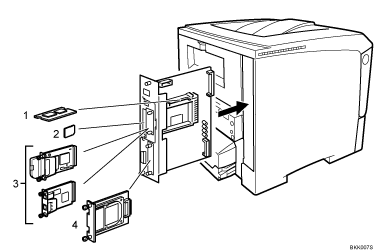
Memory Unit Type C 128MB/ 256MB (SDRAM module)
Install 128 MB or 256 MB SDRAM module into the controller board slot.
See Attaching Memory Unit Type C 128MB/256MB (SDRAM Module).
Optional cards
Optional boards
Hard Disk Drive Type 2650
You cannot install following options at the same time:
IEEE 802.11b Interface Unit Type N
Gigabit Ethernet Board Type A
 |
 | Copyright (C) 2008 |
