












 Manuals
 Contents
 Previous
 Next
Next


| | | |
| |||
| |||
| | | |
| ManualsContentsPreviousNext | | |

If you attach the duplex unit and the paper feed unit, the paper feed unit must be attached prior to attaching the duplex unit.
Check the printer nameplate to confirm the model code.
Check the contents of the box for the following items:
AD1000 (Duplex Unit)
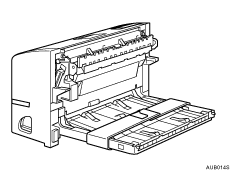
Turn off the power of the printer, and then unplug the power cable.
Remove the adhesive tape and paper.
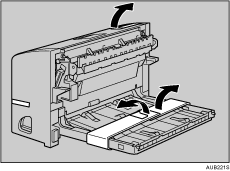
Open the rear cover.
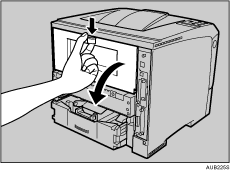
Lower the rear cover until it is horizontal, and then pull it away.
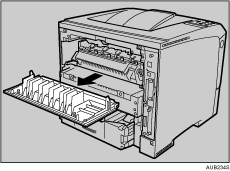
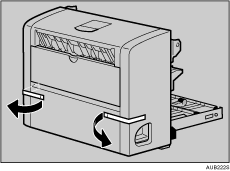
Proceed to step 7 if the paper tray cover is not installed.
Pull the bottom of the paper tray cover ( ) up slightly, and then remove the paper tray cover (
 ), in the order shown in the illustration.

Push in the duplex unit along the rails at the back of the printer.
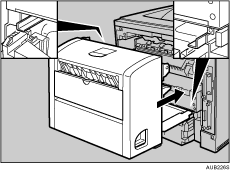
Push the duplex unit securely into the printer.
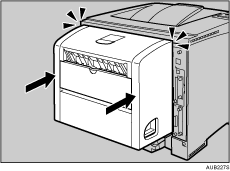

After finishing installation, you can check whether the duplex unit is properly installed: Print the configuration page from the [List/Test Print] menu. If it is installed properly, you will see "Duplex Unit" for "Connection Equipment" on the configuration page.
If the duplex unit is not installed properly, repeat the procedure from the start. If you cannot install it properly even after reinstallation, contact your sales or service representative.
If the printing position is not correct, adjust the registration of the trays. For more information about adjusting the registration of the trays, see "Adjusting Tray Registration".
The rear cover of the printer is not used with the duplex unit attached, keep it for possible future use.

"Printing the Test Page", Quick Installation Guide.
 |
 | Copyright (C) 2008 |
