


J048 Appears
"J048" notifies a jam that occurs when the image-scanning (TIM-Mag) unit fails to detect the paper's image position detection mark (L-mark) correctly.
Notes on the image position detection mark (L-mark)
J048 can be detected when settings are specified as follows.
If 1103: [Image Position Feedback Correction] is set to "No Detection Mark" or "Detection Mark" in [Detailed settings] for custom paper.
If the correction is set to "Off", printing continues without JAM048 occurring. However, image position correction for handling JAM048 is not executed.
If 0301: [Detect JAM048] in Adjustment Settings for Operators is set to [On].
If set to [Off], JAM048 does not appear in a situation where JAM048 occurs during paper feeding, but paper feeding continues without the image position correction, which uses the detection unit after fusing.
Cause/Solution:
Cause | Solution |
|---|---|
Using non-white paper | Use white paper. |
Incorrect paper weight/thickness setting | Specify the paper weight/thickness setting correctly. |
Incorrect paper size setting | Specify the paper size setting correctly. |
Registration marks and printed image overlap. | In [Detailed settings] for custom paper, select 1239: [Margin], and then adjust the margins at the leading and trailing edges in "01", "02", "03", "04", "05", "07", "08", and "09".
|
Registration mark protrudes from print area. | In [Detailed settings] for custom paper, select 1239: [Margin], and then, in accordance with the printer settings, adjust the margins at the leading and trailing edges in "01", "02", "03", "04", "05", "07", "08", and "09" to change the position of the registration mark.
|
Registration marks are faint. | In Adjustment Settings for Operators, adjust the density in 0201-01 [Execute Image Quality Adjustment: Adjust Image Density]. |
Registration marks are distorted. | Carry out the applicable troubleshooting according to the type of problem. See Toner Blasting (Trailing Edge) See Horizontal Black Streaks in the area 9 mm (0.3 inches) from the leading edge of the paper |
Registration mark concealed by paper becoming bent at a corner. |
|
Auto image position adjustment is not being executed. | Execute auto image position adjustment. |
The exposure glass of the TIM-Mag unit is stained. | Wipe the exposure glass with a dry cloth for glasses. |
The rollers downstream of the TIM-Mag unit are stained. | Wipe the rollers with a dry cloth designed for glasses. |

Registration mark
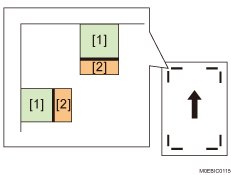
Range of [1]: Printing is prohibited in this area regardless of the presence of registration marks.
Range of [2]: Printing is prohibited in this area if a registration mark is present. (However, printing is allowed for images with a line thickness of 0.2 mm or less if there is a space of 2 mm or more in the direction perpendicular to each mark.)
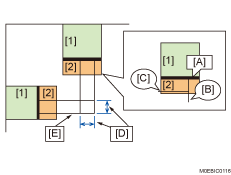
The lines perpendicular to the mark [A] may be printed. The lines parallel to it cannot be printed.
[B]: Printable
[C]: Not printable
[D]: Space of 2 mm or more from the line
[E]: Line thickness of 0.2 mm or less.