


Toner Blasting (Trailing Edge)
Toner blasting occurs at a part of a line or character in an area between 8 and 13 mm (0.3 and 0.5 inches) from the trailing edge of the paper and the area approximately 20 mm (0.8 inches) from the left edge.
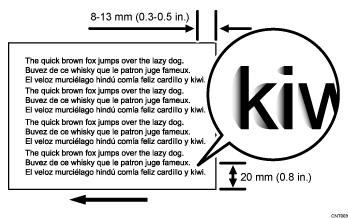
Cause:
During paper transfer, jitter is produced when the trailing edge of paper passes the paper feed guide, resulting in blasting of part of the toner forming characters or lines.
Occurrence conditions:
When printing on paper with a thickness of Paper Weight 4 or more.
Solution:
(a) Adjusting the image transfer output
 If the paper is not registered as custom paper, register the brand of the paper.
 In [Detailed settings] for custom paper, Select 1212: [Image Transfer Output], and then check if the value for the intermediate (image) transfer output for the mode you use is set to "+10" (upper limit).
1212-01: Image Transfer Output: BW: Black
1212-02: Image Transfer Output: FC/FCS: Black
1212-03: Image Transfer Output: FC/FCS: Cyan
1212-04: Image Transfer Output: FC/FCS: Magenta
1212-05: Image Transfer Output: FC/FCS: Yellow
1212-06: Image Transfer Output: FC/FCS: Clear/Special
1212-07: Image Transfer Output: FC/FCS: White
1212-08: Image Transfer Output: FC/FCS: Metallic
1212-10: Image Transfer Output: S: Clear/Special
1212-11: Image Transfer Output: S: White
1212-12: Image Transfer Output: S: Metallic
Yes | If already set to the upper limit, there is no other solution. |
No | Go to the next step. |
 Increase the value by one step.
 Print the image. Has the problem been resolved?
Yes | Finished! |
No | Start over from Step 3. |
(b) Adjusting the printing speed
In [Detailed settings] for the custom paper you are using, select 1231: [Print Speed], and then set the value in the following corresponding settings to [Low].
Productivity Priority
1231-01: Print Speed: BW/FC/FCS: BW/FC/FCS
1231-02: Print Speed: FCS: Clear/Special
1231-03: Print Speed: FCS: White
1231-04: Print Speed: FCS: Metallic
1231-06: Print Speed: S: Clear/Special
1231-07: Print Speed: S: White
1231-08: Print Speed: S: Metallic
High Quality
1231-10: Print Speed: BW/FC/FCS: Fuser Setting HQ: BW/FC/FCS
1231-11: Print Speed: FCS: Fuser Setting HQ: Clear/Special
1231-12: Print Speed: FCS: Fuser Setting HQ: White
1231-13: Print Speed: FCS: Fuser Setting HQ: Metallic
1231-15: Print Speed: S: Fuser Setting HQ: Clear/Special
1231-16: Print Speed: S: Fuser Setting HQ: White
1231-17: Print Speed: S: Fuser Setting HQ: Metallic

Reducing the print speed reduces the jitter produced when the trailing edge of the paper passes.
Select "Clear/Special" when using Neon Yellow, Neon Pink, or Invisible Red. Select "Metallic" when using Gold or Silver.
(c) Changing the paper direction
Change the paper from that in the cross-grain direction to that in the grain direction.