


Horizontal Black Streaks in the area 9 mm (0.3 inches) from the leading edge of the paper
Black banding perpendicular to the paper feed direction appears in the area approximately 9 mm (0.3 inches) from the leading edge of the paper.
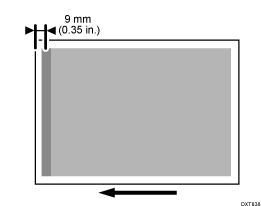
Cause:
The leading edge of the paper slackens and bumps into the intermediate transfer belt, causing black streaks to appear in the area 9 mm (0.3 inches) from the leading edge of the paper.
This is prone to occur to coated or other smooth paper.
This problem may worsen if the positions of the K and S toners are switched.
Solutions:
 Check if the positions of the K and S toners are switched.
Yes | Restore the positions of the K and S toners and go to the next step. |
No | Proceed to Step 3. |
 Print the image. Has the problem been resolved?
Yes | Finished! |
No | Go to the next step. |
 Executing the toner refreshing
Execute Toner Refreshing. Then print 30 sheets of solid-fill images with 100% density for each color of CMYK.
 Print the image. Has the problem been resolved?
Yes | Finished! |
No | No further improvement is likely. |