


 Previous
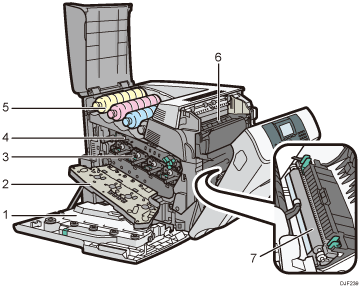
Waste Toner Bottle
Collects toner that is wasted during printing.
If the message which prompts you to replace it appears on the display, replace the waste toner bottle.
For details about the messages that appear on the screen when consumables need to be replaced, see Replacing Other Consumables.
Inner Cover
Open this cover when replacing the drum unit or transfer unit.
Drum Unit
From the left, the drum units are installed in the order of yellow (Y), magenta (M), cyan (C), and black (K).
For details about the messages that appear on the screen when consumables need to be replaced, see Replacing Other Consumables.
Transfer Unit
Replace the transfer unit and transfer roller together.
For details about the messages that appear on the screen when consumables need to be replaced, see Replacing Other Consumables.
Toner
From the left, the toner is installed in the order of yellow (Y), magenta (M), cyan (C), and black (K).
For details about the messages that appear on the screen when consumables need to be replaced, see Adding Toner (Print Cartridge).
Fusing Unit
Replace the fusing unit and the dustproof filter together.
For details about the messages that appear on the screen when consumables need to be replaced, see Replacing Other Consumables.
Transfer Roller
Replace the transfer roller and the transfer unit together.
For details about the messages that appear on the screen when consumables need to be replaced, see Replacing Other Consumables.


