


 Previous
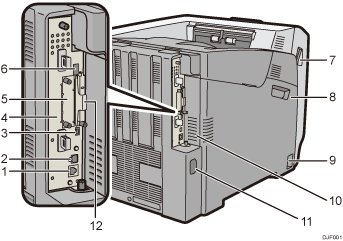
Ethernet port
Use a network interface cable to connect the printer to a network.
USB port B
Use a USB cable to connect the printer to a computer.
USB port H (Port for use by customer engineer)
Do not use this port.
Controller Board
Slide this out to install options such as the memory unit or printer hard disk. Plug cables such as a USB cable and Ethernet cable into their connectors.
Optional interface board slot
Optional interface boards can be inserted.
Insert an optional wireless LAN interface board, IEEE 1284 interface board, or USB device server board.
USB port A
Connect external devices such as a digital camera, a card authentication device, etc.
Front Cover Open Levers
Pull these levers toward the front side of the printer to open the front cover.
Left Cover
Open this cover when replacing the drum unit, transfer unit or waste toner bottle.
Main power switch
Use this switch to turn the power on and off.
For details about how to shut down the printer, see Turning Off the Power.
Ventilation holes
To prevent overheating, heat from internal components is released through these ventilation holes.
Malfunctions and failure can result if these ventilation holes are blocked or obstructed.
The dustproof filter needs to be replaced regularly for proper maintenance.
Power connector
Connect the power cord to the printer. Insert the other end into an electrical outlet.
Expansion card slots
Remove the cover to install SD cards.


