




Paper Library Screen
This section explains the items on the “Recall Paper Library” screen.
This screen appears when you press [Recall Paper Library] on the Tray Paper Settings screen.
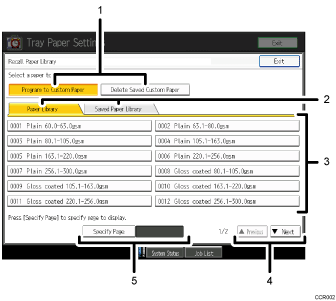
[Program to Custom Paper], [Delete Saved Custom Paper]
When “Program to Custom Paper” is selected, selecting a paper from the list allows you to register the selected paper as a custom paper. For details, see “Selecting the Paper's Name from the Paper Library” and “Selecting the Paper's Type from the Paper Library”.
“Delete Saved Custom Paper” can be used only by the machine administrator.
“Paper Library” tab, “Saved Paper Library” tab
Switches between the “Paper Library” and “Saved Paper Library” screens.
List of papers
When the “Paper Library” tab is selected:
The library's paper list appears.
When the “Saved Paper Library” tab is selected:
A list of the custom papers that are saved in the library appears.
[
 Previous], [
 Next]
Next]Displays the previous or next page of the list.
[Specify Page]
Allows you to view a particular page in the list.

The types of paper in the paper library depend on the version of the library and the region in which you are using the machine.


