




Selecting the Paper's Type from the Paper Library
You can select the type of paper from the paper library and register it as a custom paper.
The selectable paper types are as follows: Plain, Gloss coated, Matte coated, Envelope, Pre-Punched, and Tab Stock.
 Press the [Paper Setting] key.
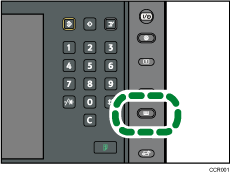
The control panel on your machine might differ slightly from the control panel in this illustration.
 Press [Recall Paper Library]
 Select the type and thickness of your paper.
The list of paper types appears on the first and following pages in the paper library.
Select the most appropriate combination of type and weight for your paper.
Press [ Previous] or [
 Next] to scroll through the list to find the paper that you want to select.
To specify a particular page in the list, press [Specify Page], enter a page number using the number keys, and then press [ ].
].
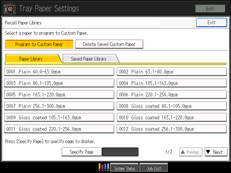
The selected paper is registered as a custom paper.
 Press [Exit].
 Press [Exit].
 Press the [Paper Setting] key.
You can also close the Tray Paper Settings screen by pressing [Exit].

To modify a custom paper, see “Modifying a Custom Paper”.


