












 Manuals
 Contents
 Previous
 Next
Next


| | | |
| |||
| |||
| | | |
| ManualsContentsPreviousNext | | |
This section describes how to load paper into the interposer.

Load paper on the side already printed (the front side). If you are using the Booklet Finisher (Saddle Stitch), load sheets print side down.
Load paper in the interposer in the same orientation as paper in the paper tray.
The staple or punching location will be on the left side of the paper, when you are facing the machine.
Do not place anything on top of or leave documents on the sensor. This may lead to the paper size not being correctly detected or paper jams.
When using the Z-fold function, the paper in the interposer must be of the same size as the prints after they have been Z-folded. If the paper in the interposer is larger than the Z-folded sheets, a misfeed might occur.
Each tray can hold up to 200 sheets of paper. Do not stack paper over the limit mark.
Do not use paper that has already been printed onto by this machine.
While pressing the release lever, align the side fences with the paper size to be loaded.
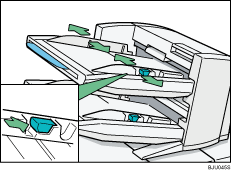
Load paper orderly. Tightly fit the side fences to the loaded paper.
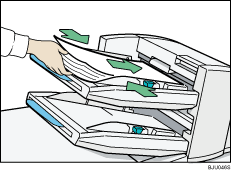
When loading paper larger than A4, draw out the paper extender.

When paper is loaded which cannot be detected automatically, the user must set the paper size on the control panel.
 |
 | Copyright (C) 2008, 2009 |

