




 Previous
When loading perforated paper, attach the magnet sheet.
 Check that paper in the paper tray is not being used, and then pull the tray out carefully until it stops. Remove any paper that is loaded in the tray.
 Take out the magnet sheet from the pocket on the right-hand side of the wide Large Capacity Tray.
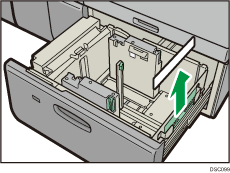
The side of the end fence that touches the paper
 Attach the magnet sheet to the side of the end fence that touches the paper.
Push both corners at the bottom of the magnet plate against the metal plates strongly.
Make sure that the top of the magnet sheet does not obstruct the opening in the end fence.
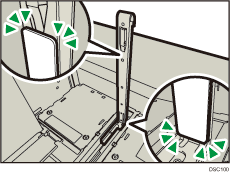
The side of the end fence that touches the paper
 Load paper and slide the paper tray in fully and carefully.

Put the magnet sheet back in the pocket when you finish using it.


