




 Previous
When loading carbonless paper of paper weight 0, attach the tab fence (small).

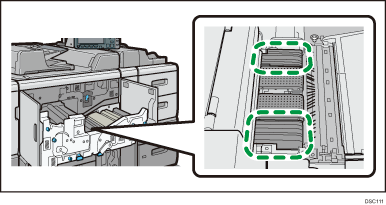
To print on carbonless paper of Paper Weight 0, open the front cover, pull out the drawer unit, and then wipe with a dry and clean cloth six ribs each on the front and back sides in the figure before printing. Wipe off dirt or toner on the top and side of each rib. Toner smear may appear on the printed paper if prints are made while the ribs are stained.
 Check that paper in the paper tray is not being used, and then pull the tray carefully out until it stops.
 Take out the tab fence (small) from the pocket on the right-hand side of the paper source tray.
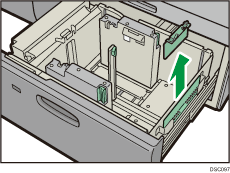
 Set the side fences to the size of the paper to be loaded, and then load carbonless paper into the tray.
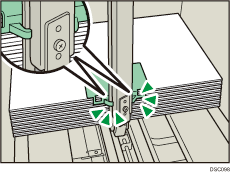
 Attach the tab fence (small), and then align the end fence gently against the paper you loaded while pressing the release button of the end fence.
 Push the paper tray fully in until it clicks.
Replace the tab fence (small) after use.


