


 Previous
The paper misfeed message " (B) (C)" appears when a paper misfeed occurs in the internal paper feed path.

Forcefully removing misfed paper may cause paper to tear and leave scraps of paper in the printer.
Remove the paper from the bypass tray before opening the front cover.
If a misfeed occurs when using the bypass tray, open the front cover, and then remove the misfed paper.
The inside of this printer becomes very hot. Before removing paper around the fusing unit, wait until the temperature of the covers inside the fusing unit and paper transfer unit cools down.
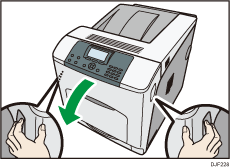
 Carefully open the printer's front cover by pulling the left and right side levers.
 Remove misfed paper slowly.
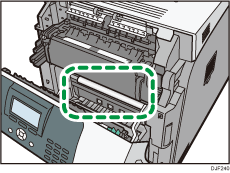

If you cannot find the misfed paper, look inside the printer.
 If a misfeed occurs in the output area of the fusing unit, open the output cover by pulling back the levers marked "C" (left and right on the fusing unit's upper side).
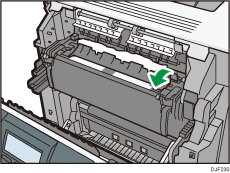
 Remove misfed paper slowly.
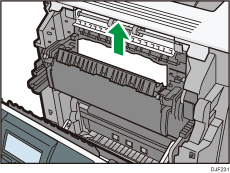
 Close the output cover of the fusing unit.
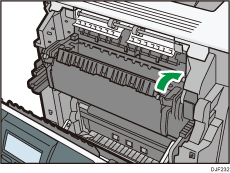
 Carefully close the front cover.

When closing the front cover, push the upper side of the cover firmly. After closing the cover, check that the error has cleared.


