




 Previous
You can mute all of the other contacts simultaneously by using the Mute Others function. A contact that has been muted can speak by unmuting the product that is being used.
If your contact uses a product that can perform the Mute Others function, you can mute at any time during the meeting and the mute will be effective until the meeting ends.
 Press the [Menu] key/
 when you are in a meeting or viewing the Connection Check screen.
 Press the [
 ] or [
 ] key to select [Mute Others], and then press the [Enter] key.
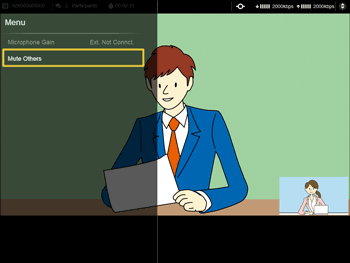
The microphones at all other contacts will be muted.

The Mute Others function performed later will be effective. If another contact performs the Mute Others functions, your contact will be muted.
The microphones at the contacts that join a muted meeting are also muted.
The following products can execute the Mute Others function:
RICOH Unified Communication System P3500
RICOH Unified Communication System for Windows
RICOH Unified Communication System 360 VR Live
If using other RICOH Unified Communication System products, these products only have the function to be unmuted when the Mute Others function is being used.
The Mute Others function cannot be used in meetings using RICOH Unified Communication System Advanced and RICOH Unified Communication System P3500M.


