


 Previous
To enlarge or reduce the screen, select  , the Loupe icon. If there is a stroke on the screen, it is enlarged or reduced as the screen is enlarged or reduced.
Enlarge or reduce the screen as follows:
 Touch , the Loupe icon with the pen nib.
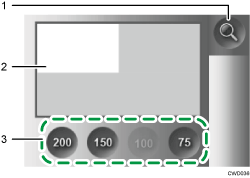
Loupe icon
Navigator window
Display magnification
 Specify a scale factor for enlargement or reduction using the pen nib.
Touch [Reset] to return to the previous magnification and position.
 To move the display position, touch , the Loupe icon to specify where you want to display the screen on the navigator window.


