




 Manuals
 Contents
 Previous
 Next
Next


| | | |
| |||
| |||
| | | |
| ManualsContentsPreviousNext | | |
If the registration roller is dirty, a misfeed might occur. In this case, clean the roller as follows:

|

|
Clean the registration roller if dots (caused by specks of paper stuck to the roller) appear on printed OHP transparencies.

Do not hold the print cartridge upside down or stand it vertically.
Do not place the print cartridge on an unstable or tilted surface.
Do not use chemical cleaners or organic solvents such as thinners or benzine.
Turn off the power, and then unplug the power cable.
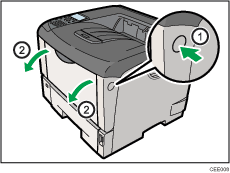
Open the front cover by pushing the front cover release button.
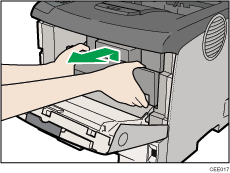
Lift the front side of the print cartridge, and then pull it out of the printer.
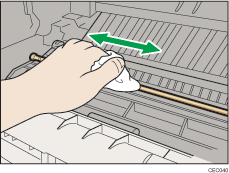
Wipe around the metallic registration roller by turning with a soft damp cloth.
Hold the grips of the print cartridge, and then insert it into the printer until it stops.
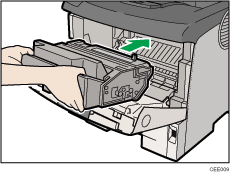
Push down the print cartridge to secure it in the appropriate position.
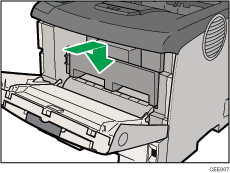
Close the front cover.
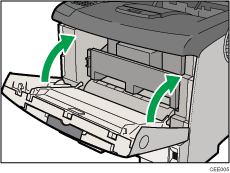

Carefully close the front cover. If you cannot close the cover easily, pull the print cartridge out of the printer and insert it again. After that, close the front cover again.
 |
 | Copyright (C) 2010 |
