












 Manuals
 Contents
 Previous
 Next
Next


| | | |
| |||
| |||
| | | |
| ManualsContentsPreviousNext | | |
If you apply this mode, you can place originals of different sizes together in the ADF. The machine will automatically detect the size of each original and copy it accordingly.

When placing originals of different sizes in the ADF and making copies without using the Mixed Sizes mode, paper might become jammed or parts of the original image might not be copied.
The sizes of the originals that can be placed in this mode are as follows:
Metric version
A3 , B4 JIS, A4
 , B5 JIS
Inch version
11 × 17, 81/2 × 14, 81/2 × 11
You can place originals of two different sizes at a time.
Press [Special Original].
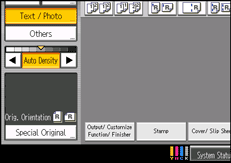
Select [Mixed Sizes], and then press [OK].
Align the rear and left edges of the originals as shown in the illustration.
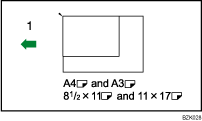
Place the originals into the ADF
Adjust the document guides to the widest original size.
Place originals in the ADF.
Press the [Start] key.

For details about weights of paper that can be used with this mode and other relevant information, see "Supplementary Information".
 |
 | Copyright (C) 2010 |

