












 Manuals
 Contents
 Previous
 Next
Next


| | | |
| |||
| |||
| | | |
| ManualsContentsPreviousNext | | |
This section describes how to load paper in the Large Capacity Tray. The Large Capacity Tray is referred to as Tray 3, Tray 4, and Tray 5.

Various sizes of paper can be loaded in Tray 3 and Tray 4 by adjusting the positions of side fence and end fence.
If you want to change the paper size of Tray 5, contact your service representative.
Check the paper's edges are aligned at the left side.
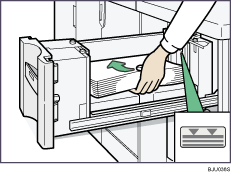
The tray can hold up to 1,000 sheets in Tray 3 and 4, and 2,550 sheets in Tray 5. Do not stack paper over the limit mark.
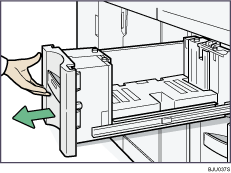
Carefully pull out the paper tray until it stops.
Load paper into the paper tray by pushing it against to the left side of the paper tray.
Load the paper print side up.
Carefully slide the paper tray fully in.
 |
 | Copyright (C) 2008, 2009 |
