












 Manuals
 Contents
 Previous
 Next
Next


| | | |
| |||
| |||
| | | |
| ManualsContentsPreviousNext | | |
This section describes how to load paper in Tray 2.

Various sizes of paper can be loaded in Tray 2 by adjusting the positions of side fences and end fence.
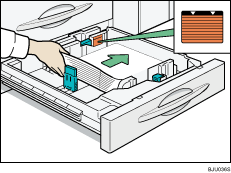
Check the paper edges are aligned with the right side.
The tray can hold up to 500 sheets. Do not stack paper over the limit mark.
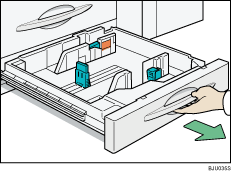
Carefully pull out the paper tray until it stops.
Square the paper and load it print side down.
Carefully push the paper tray fully in.

When paper is loaded which cannot be detected automatically, the user must set the paper size on the control panel.
 |
 | Copyright (C) 2008, 2009 |

