




Replacing the Paper Feed Roller
Replace all feed rollers including the printer and the optional paper feed unit(s). The following procedure shows how to replace the paper feed rollers of the printer and the optional paper feed units.

When lifting the machine, use the inset grips on both sides. Otherwise the printer could break or cause injury if dropped.
When lifting the paper feed unit, hold the bottom of it, and then lift it slowly. Lifting it carelessly or dropping it may cause an injury.

Always move the printer horizontally. Turning the printer sideways or tilting it backward or forward while moving will result in toner leakage.
Do not put the printer on an unstable or sloped surface.
Be sure to move the printer horizontally. Moving the printer up and down may cause toner to scatter.
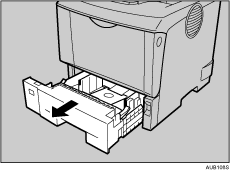
 Lift the paper tray slightly, and then pull it out until it stops.
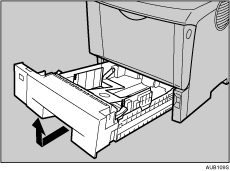
 Lift the front side of the tray, and then pull it out of the printer.
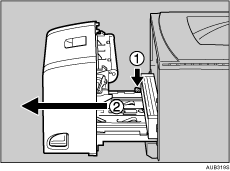
 If the optional duplex unit is attached, push down the lever on the right side of the duplex unit (
 ), and then pull it out until it stops (
 ).
).
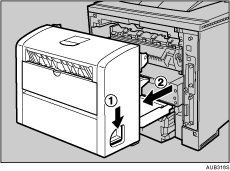
 Push the under board levers (), and then pull the duplex unit out of the printer ().
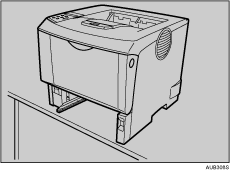
 Move the printer to the edge of a sturdy and stable table or desk.
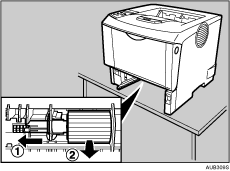
 Slide the green lock lever to the left (), and then remove the paper feed roller ().
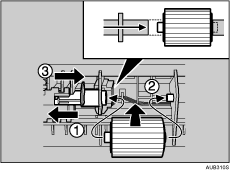
 While sliding the green lock lever to the left (), set the new roller (). Then, return the green lock lever to its original position (
 ).
).
Confirm the green lock lever secures the roller correctly by checking that sure the new roller rotates smoothly.
 If the printer is equipped with the optional paper feed unit(s), follow the same procedure to replace its paper feed roller.
If you installed two paper feed units, also replace both their paper feed rollers.
 Place paper in the removed paper trays. Lift the front of the tray, and then slide it carefully into the printer until it stops.
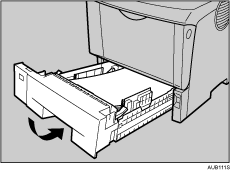
 When the optional duplex unit was removed, push in the duplex unit along the rails in the back of the printer.
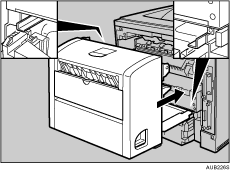
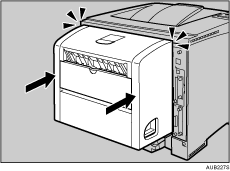
 Securely push the duplex unit into the printer.

If the printer is equipped with the optional paper feed unit, do not move the printer and the unit together, because they are not securely attached.


