




Replacing the Fusing Unit

The fusing unit becomes very hot. When installing a new fusing unit, turn off the printer and wait at least an hour before replacing the old fusing unit. Not allowing the unit to cool may result in burns.
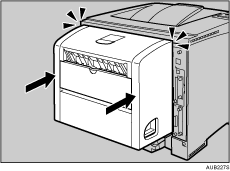
 Open the rear cover.
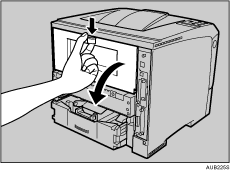
 Lower the rear cover until it is horizontal, and then pull it away.
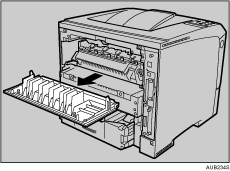
 If the optional duplex unit is attached, push down the lever on the right side of the duplex unit (
 ), and then pull it out until it stops (
 ).
).
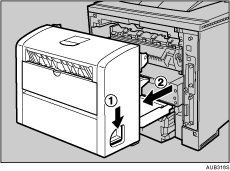
 Push the under board levers (), and then pull the duplex unit out of the printer ().
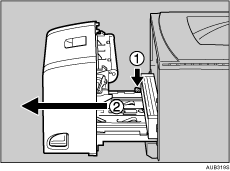
 Lift the lock levers of the fusing unit as shown in the illustration.
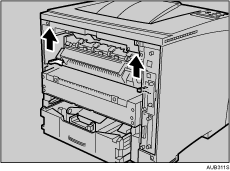
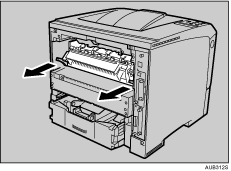
 Pull the fusing unit out.
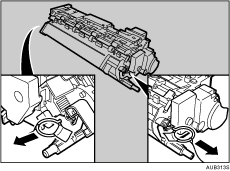
 Pull out the pins on both sides of the new fusing unit.
 Push the new fusing unit into the printer.
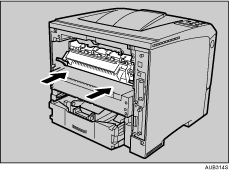
 Push the lock levers of the fusing unit down until they click.
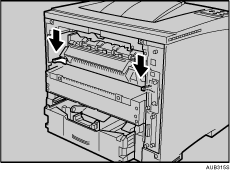
 Position the rear cover horizontally and align it with the grooves in the printer's interior.
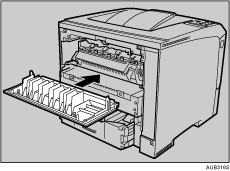
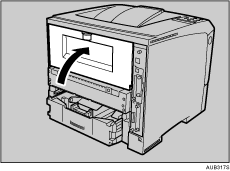
 Close the rear cover.
 When the optional duplex unit was removed, push in the duplex unit along the rails in the back of the printer.
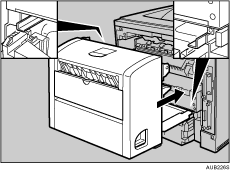
 Securely push the duplex unit into the printer.
 Print a configuration page to confirm that the printer works properly.

"Print the Test Page", Quick Installation Guide.

