




USB Connection

For users outside the United States of America: properly shielded and grounded cables and connectors must be used for connections to a host computer (and/or peripheral) in order to meet emission limits.
For users in the United States of America: properly shielded and grounded cables and connectors must be used for connections to a host computer (and/or peripheral) in order to meet FCC emission limits.

The USB2.0 cable is not supplied with the printer. Obtain a cable that is suitable for the computer you are using.
USB connection is possible under Windows 2000/XP/Vista, Windows Server 2003/2003 R2, and Mac OS X.
USB connection with Macintosh is only possible via the printer's USB port.
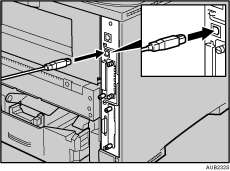
 Connect the square-shaped connector of the USB2.0 cable to the USB port.
 If the Gigabit Ethernet board is attached, connect the square-shaped connector of the USB2.0 cable to the USB port of the board.
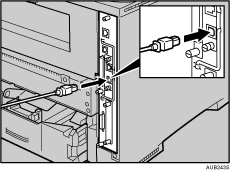
The printer's Ethernet and USB ports are not available when the Gigabit Ethernet board is attached to the printer.
 Connect the opposite end's flat connector to devices such as your computer's USB interface, or a USB hub.

"Installing the Printer Driver Using USB", Software Guide


