




Parallel Connection

For users outside the United States of America: properly shielded and grounded cables and connectors must be used for connections to a host computer (and/or peripheral) in order to meet emission limits.
For users in the United States of America: properly shielded and grounded cables and connectors must be used for connections to a host computer (and/or peripheral) in order to meet FCC emission limits.

The parallel interface cable is not supplied with the printer.
The printer's parallel connection is a standard bidirectional interface that requires an IEEE 1284-compliant 36-pin parallel cable and a computer parallel port.
Use shielded interface cable. Unshielded cables create electromagnetic interference that could cause malfunctions.
Voltage rating of the computer's parallel port: DC 5 V (max.)
 Turn off the printer and computer.
 Connect the cable to the interface socket of the IEEE 1284 port.
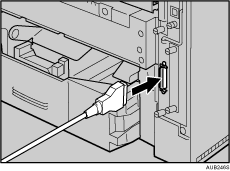
 Securely attach the other end of the parallel cable to your computer's parallel port. Secure the cable.

"Printing with Parallel Connection", Software Guide.

