




Attaching Gigabit Ethernet Board Type A

Do not touch the inside of the controller board compartment. Doing so may cause a malfunction or a burn.

The printer's ethernet and USB ports are not available when the Gigabit Ethernet board is attached to the printer. Instead, you can use the ethernet port and USB port mounted on the board.
Before handling the Gigabit Ethernet board, ground yourself by touching something metal to discharge any static electricity. Static electricity can damage the Gigabit Ethernet board.
Do not subject the Gigabit Ethernet board to physical shocks.
 Check the contents of the box.
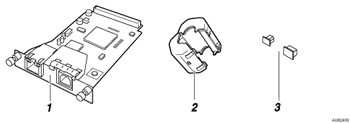
Gigabit Ethernet Board
Ferrite Core
Protective caps (one each for the ethernet port and the USB port)
 Turn off the power, and then unplug the power cable.
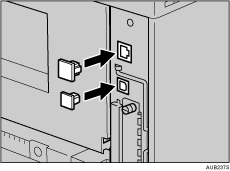
 Disconnect the cables from the Ethernet port and the USB port of the printer, and cover each port with its protective cap.
 Remove the two screws and the cover of the Gigabit Ethernet board mounting bracket.
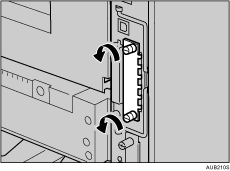
The removed cover is not used when installing the Gigabit Ethernet board. Keep it for possible future use.
 Attach the Gigabit Ethernet board to the controller board.
Insert the end of the Gigabit Ethernet board into the slot.
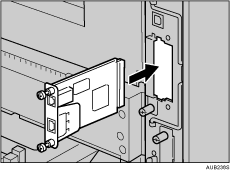
 Fasten the Gigabit Ethernet board to the controller board with two screws.
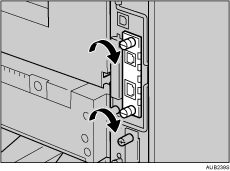
Check the Gigabit Ethernet board is connected firmly to the controller board.

Use a coin or similar object if the screws do not turn easily.
After finishing installation, check the Gigabit ethernet board is installed properly: print the configuration page from the [List/Test Print] menu. If it is installed properly, you will see "Gigabit Ethernet" for "Device Connection" on the configuration page.
If the Gigabit ethernet board is not installed properly, reinstall it following this procedure. If you cannot install it properly even after attempting reinstallation, contact your sales or service representative.
You need to make settings with the control panel before using the Gigabit Ethernet board. For details, see "Ethernet Configuration".

"Printing the Test Page", Quick Installation Guide.


