


Trailing Edge of Stapled Sheets Close to the Paper Exit
Cause:
If the stapled sheets are curled strongly or become limp after delivery, the trailing edge of the sheets may be too close to the paper exit when the paper is stacked.
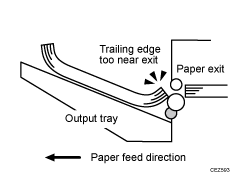
If this happens, stapled sheets, when delivered, may push the previously delivered sheet, resulting in paper bending or misfeeding.
Occurrence conditions:
There is a tight curl on a delivered set of stapled sheets.
Limp paper such as thin or recycled paper is used.
Solution:
 Attach the Z-fold support tray for multi-folding unit.
 Print the image. Is the problem resolved?
Yes | Finished! |
No | Go to the next step. |
 In [Detailed settings] for custom paper, select 1321: [Correct Paper Curl], and then specify [U Curl Correction Level: Large] or [U Curl Correction Level: Small].
 Print the image. Is the problem resolved?
Yes | Finished! |
No | Contact your service representative. |

For details about attaching the Z-fold support tray for multi-folding unit, see Special Notes When Using External Options.
If the Z-fold support tray for multi-folding unit is attached, the trailing edge of the ejected sheets will not be too close to the paper exit, so no problem will occur. However, the stapled sheets may not be stacked properly.