


Excessive Skew/Shifting (J097, J098)
Cause:
Due to the long distance between the paper feed belt and topmost paper of the stack just before the bottom plate elevation, the paper orientation is unstable when it adheres to the paper feed belt, resulting in excessive skews.
Solution:
 Perform the common troubleshooting procedure.
For details, see Common Troubleshooting.
 Check if the skew is resolved.
Yes | Finished! |
No | Go to the next step. |
 If using paper with a thickness of Paper Weight 5 or below, extend the paper retainer.
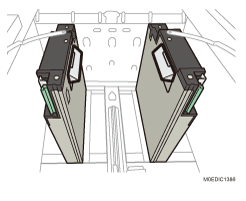
If using paper with a thickness of Paper Weight 6 or above, go to the next step.
 To feed paper from Vacuum Feed Banner Sheet Tray Type S9, attach the end fence for long paper.
For details, see Attaching the Side Fences, Auxiliary Side Fence, and End Fence (for Long Paper).
For paper with a length of 420.0 mm to 559.9 mm (16.5 inches to 22.0 inches), attach the 2 short end fences.
For paper with a length of 560.0 mm to 700.0 mm (22.0 inches to 27.6 inches), attach the 1 long end fence.
 If feeding paper from the paper feed tray, attach the tab sheet holder and small tab end fence.
For paper width of 297 mm (11.7 inches) or above, attach the tab sheet holder. For details, see Attaching the Tab Fence in the Wide Large Capacity Tray.
For paper width below 297 mm (11.7 inches), attach the small tab end fence. For details, see Attaching the Small Tab End Fence to the Wide Large Capacity Tray.
 Check if the skew is resolved.
Yes | Finished! |
No | Go to the next step. |
 To feed paper from Extension output banner sheet tray, attach the side fences and end fence for extra-long paper. For paper with a length of 487.8 mm (19.2 inches) or above, change the maximum stack height from 50 mm to 40 mm (2.0 inches to 1.6 inches).
For details, see Attaching the Side Fences, Auxiliary Side Fence, and End Fence (for Long Paper).
Otherwise, go to the next step.
 Check if the skew is resolved.
Yes | Finished! |
No | Go to the next step. |
 If stacking paper exceeding a length of 487.8 mm (19.2 inches) on Extension Vacuum Feed Banner Sheet Tray Type S14, reduce the number of stacked sheets according to the lower level as indicated on the stacking height decal.
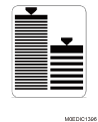
 Remove the tab sheet holder or small tab end fence.
 In [Detailed settings] for custom paper, select 1301: [2-Tray LCIT: Paper Feed Mode] and set [Paper Feed Mode:Fan Level] to [Prevent Double Feed (Weaker Blow)].
 Check if the skew is resolved.
Yes | Finished! |
No | Go to the next step. |
 In [Detailed settings] for custom paper, select 1301: [2-Tray LCIT: Paper Feed Mode] and set [Paper Feed Mode:Fan Level] to [Prevent Double Feed (Weakest Blow)].
 Check if the skew is resolved.
Yes | Finished! |
No | There is no other solution, so do not feed paper. |