


Roller Marks Appearing When Dark-Color Paper is Fed after White Paper
When black or other dark-color paper is fed after white paper, roller marks may appear.
Roller marks appear at the following positions.
In the area 33 mm (1.3 inches) away from the center of the paper (roller mark approximately 14 mm (0.6 inches) wide)
In the area 26 mm (1.0 inches) away from the center of the paper (roller mark approximately 28 mm (1.1 inches) wide)
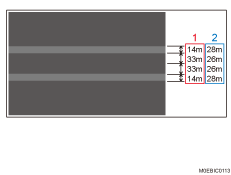
Cause:
The machine's left drawer unit and the drive rollers (rubber rollers) of the buffer pass unit (optional) are stained.
Solution:
Clean the machine's left drawer unit and the rollers of the buffer pass unit before feeding dark-color paper.
Left Drawer Unit [A]
Clean the approximately 14 mm (0.6 inches) wide roller circled in red at an area 33 mm (1.3 inches) from the center of the paper.
Clean the approximately 28 mm (1.1 inches) wide roller circled in blue at an area 26 mm (1.0 inches) from the center of the paper.
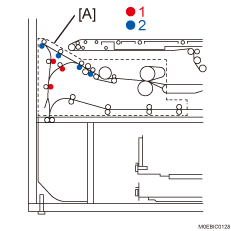

For details, see Cleaning the Buffer Pass Unit.