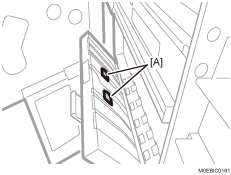
Cleaning the Rollers in the Paper Exit

For details on cleaning, see "159 Left Drawer: Paper Path 1" and "255 Detection Exit Roller (Driven)".
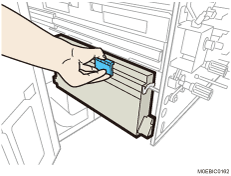
Pull out the left drawer unit toward you.
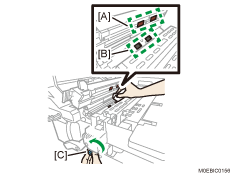
Cleaning the registration entrance transport roller
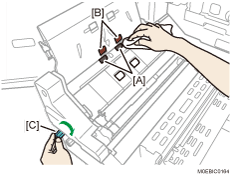
Wipe the registration entrance transport roller (drive) [A] and registration entrance transport roller (driven) [B] with a cloth moistened with alcohol. Pressing the cloth against the roller, wipe the surface of the roller while turning the knob [C].
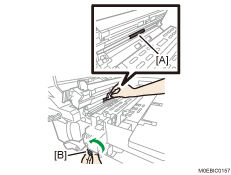
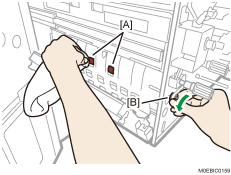
Wipe the registration Exit transport roller (drive) [A] with a cloth moistened with alcohol. Pressing the cloth against the roller, wipe the surface of the roller while turning the knob [B].
Cleaning the output relay roller
Wipe the output relay roller with a cloth moistened with alcohol.
Pull up and open the cover D4.
 Wipe the roller [A] and [B] with a cloth moistened with alcohol.
Pressing the cloth against the roller, wipe the surface of the roller [A] while turning the gear [C].
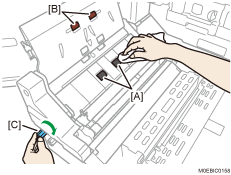
Cleaning the Output roller
Wipe the output roller with a cloth moistened with alcohol.
Wipe the roller [A] and [B] with a cloth moistened with alcohol.
Pressing the cloth against the roller, wipe the surface of the roller while turning the gear [C].
Cleaning the switchback roller
Pull down and open the cover D5.
 Pressing the cloth against the roller [A], wipe the surface of the roller while turning the gear [B].
 Wipe the switchback roller [A] with a cloth moistened with alcohol.