


Banding (General)
Density fluctuation occurs periodically in the vertical direction to the paper feed direction.
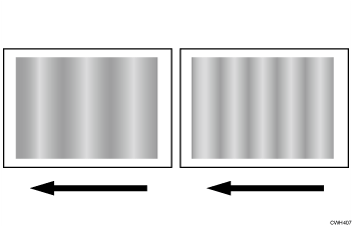
Cause:
Density fluctuation occurs when the pitch phase between the charge roller, developing roller, paper transfer roller, and photoreceptor is different.
Solution:
The solution depends on the length of intervals whereby the density fluctuation occurs.
 In the [Machine: Maintenance] group on the [Operator Adjust.] menu, execute 0501: [Execute Process Adjustment].
 Print the image. Has the problem been resolved?
Yes | Finished! |
No | Go to the next step. |
 Execute 0506: [Execute Developer Refreshing].
 Print the image. Has the problem been resolved?
Yes | Finished! |
No | Go to the next step. |
 Print a full-page, half-tone A3 sheet for each of cyan, magenta, yellow, and black, and then measure by a ruler, etc., the intervals between the spots affected by density fluctuation.
 Refer to the following table and perform the applicable solution according to the intervals between the areas affected by density fluctuation.
Interval | Affected unit | Solution |
|---|---|---|
40 mm (1.6 inches) | Charge roller's pitch circle |
|
50 mm (2.0 inches)/26 mm (1.0 inches) | Development roller's pitch circle | In Adjustment Settings for Operators, select 0201: [Execute Image Quality Adjustment], execute 02: [Density Difference: With Feed] and then check the printed image. |
189 mm (7.5 inches) | Photoconductor's pitch circle |

After performing the solution, it is recommended to perform the color calibration of the external printer controller.