


Banding: 189 mm (7.5 inches) Intervals
Density fluctuation occurs at intervals of 189 mm (7.5 inches).
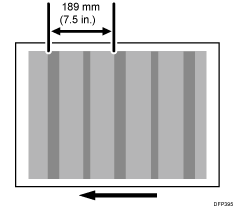
Cause:
When the operating environment changes (from high temperature to low temperature, or from low temperature to high temperature), or when the printer is used after it is left idle for a while, the photoconductor fails to be uniformly charged due to the temperature difference at the parts that come into contact with the photoconductor's developing/cleaning units (marked with in the figure below), causing uneven density to occur. In the case of a change from high temperature to low temperature, the temperature of the parts that come into contact become too high for its surroundings.
Uneven density occurs at enclosed areas, such as the openings of the development unit and cleaning unit, which come into contact with the photoconductor.
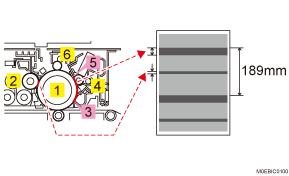
Photoconductor Unit
Development Unit
Lubrication Blade Side Seal
PCU Cleaning Unit
Lubrication Blade
Charger Unit
This is prone to occur when printing halftone images.
Solutions:
 In the [Machine: Maintenance] group on the [Operator Adjust.] menu, execute 0501: [Execute Process Adjustment] 3 times.
 Print the image. Has the problem been resolved?
Yes | Finished! |
No | Start over from Step 1. |