


Envelope Orientation and Recommended Status
The way to place an original on the load envelopes varies depending on the shape and orientation of the envelopes.

Only envelopes that are at least 139.7 mm (5.5 inches) wide can be loaded.
Misfeeds might occur depending on the length and shape of the flaps.
To print on envelopes, load them into the Wide LCT or multi bypass tray (Tray A), and be sure to specify an appropriate paper type.
To load envelopes, be sure to unfold their flaps and set them in the  orientation with print side face up.
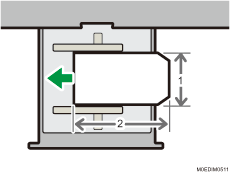
Across the feed direction
Along the feed direction
If you are printing onto side-opening envelopes, be sure to unfold their flaps and set them in the  orientation with print side face up. Flaps must be at the right side of the Wide LCT or multi bypass tray (Tray A).
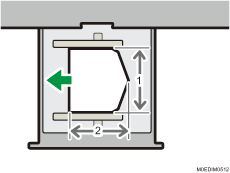
Across the feed direction
Along the feed direction
Recommended envelopes
For information about recommended envelopes, contact your local dealer.
Storage of envelopes
Keep envelopes stored in sealed plastic bags and remove only the quantity needed. Do not add envelopes during printing, as this might cause misfeeds.
Loading envelopes on the wide LCT
If a paper jam occurs, load 5 more envelopes.
Keep the height difference between the bottom of the envelopes and flaps within 10 mm.
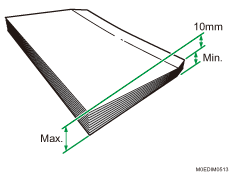

Be sure to specify the size of the envelope and flap size in the paper settings on the [Media] hub.
When using envelopes, set [Paper Weight] in the paper settings on the [Media] hub to the same value as two sheets of the paper used for the envelopes.
Before loading envelopes, press down on them to remove any air inside and to flatten any edges or creases. When envelopes are curled, flatten the envelopes so that the amount of curling is less than 5 mm (0.2 inches). If a paper jam, non-feeding or double-feeding occurs even after correcting the curl, load one envelope at one time.
Place one envelope at a time if you still get any of the following results:
The envelope jams
The envelope is not fed
Multiple envelopes are fed at the same time
Humidity levels of over 50% can cause envelopes to come out creased or misprinted.
Certain types of envelopes might come out creased, dirtied, or misprinted. If you are printing a solid color or image on an envelope, lines may appear where the overlapped edges of the envelope make it thicker.
A paper jam may occur when you use an envelope with a horizontal length less than 205 mm (11.7 inches) with the flap opened (or less than 197 mm (7.7 inches) excluding the flap). If this occurs, cancel the skew detection setting in the paper setting of the [Media] hub
 [Detailed settings]13: [Machine: Paper Feed/Output][Jam Detection][Detect/Control JAM097/098]. For details, see 1331: Jam Detection.
When printing on envelopes with a thickness of 127.0 g/m2 (34 lb. Bond) or more, do not specify [П Curl Correction Level: Large] or [U Curl Correction Level: Large] in the paper settings of the [Media] hub
[Detailed settings]13: [Machine: Paper Feed/Output][Correct Paper Curl].