


Specifying the Volume and Sound Type of a Notification Sound
Specify the sound played on the machine during operation or when an error occurs.
 Log in to the machine using a user account with administrator privileges.
 Press [
 ].
].
 Press [Notification Sound] under [Printer Settings].
 Adjust the sound volume using the slider.
Move the slider to the right to increase the volume.
You can also adjust the volume by pressing [-] and [+].
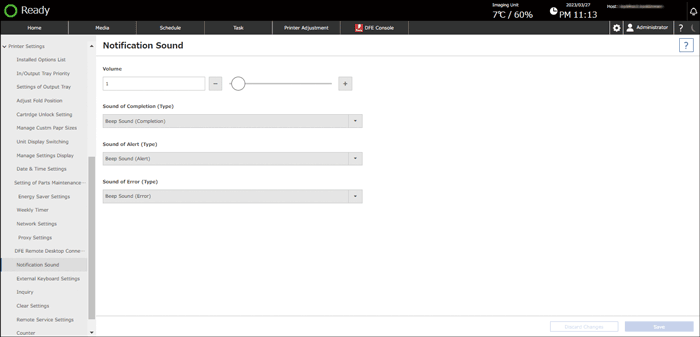
 To change the sound type, press the item (ready, alert, or error sound), and specify the sound type.
You can specify the following items.
Item | Description | Sound Type |
|---|---|---|
Sound of Completion (Type) | Sound when the machine is warming up | No Sound/Beep Sound (Completion)/Warm-up 1-2 |
Sound of Alert (Type) | Sound when there is an alert | No Sound/Beep Sound (Alert)/Alert 1-3 |
Sound of Error (Type) | Sound when there is an error | No Sound/Beep Sound (Error)/Error 1-3 |
 Press [Save].