


Connecting to the Network
Connect the LAN cable to the machine, and then specify the IP address and other settings to connect to the Local Area Network (LAN) connection on the machine.
Settings for the Connection in Printer Settings
Configure the settings from the [Network Settings] in [Printer Settings].
 Log in to the machine using a user account with a role that can change the network settings.
 Press [
 ].
].
 Press the [Network Settings] in [Printer Settings].
 Activate "IPv4" or "IPv6", and configure the network settings.
According to the protocol to use, specify the following settings:
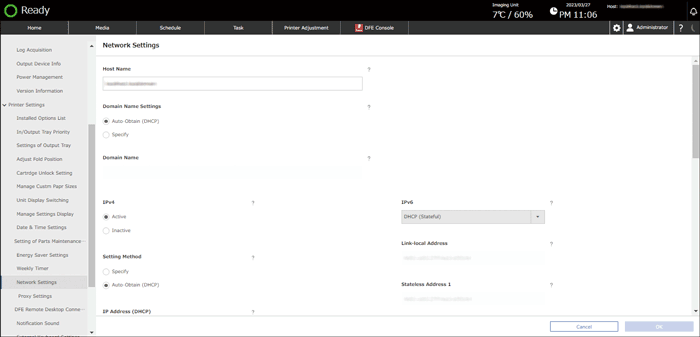
IPv4
IPv4: Specify whether to enable or disable IPv4.
Setting Method: Specify [Specify], and enter the IP address, subnet mask, and default gateway when configuring the IP address manually.
IP Address
Subnet Mask
Default Gateway
DNS Server 1: Enter the IP address of the server. Enter the IPv4 address of the DNS server.
DNS Server 2: Enter the IP address of the server when specifying the secondary DNS server. Enter the IPv4 address of the secondary DNS server.
IPv6
IPv6: Specify how to configure the IPv6 address from Inactive, Automatic (Stateless), DHCP (Stateful), and Manual Setting.
Enter an IP address, Prefix Length, and default gateway when you select "Manual Setting".
IP Address
Prefix Length: Enter a value between 1 and 128. (Default setting: 64)
Default Gateway
DNS Server 1: Enter the IP address of the server. Enter the IPv6 address of the DNS server.
DNS Server 2: Enter the IP address of the server when specifying the secondary DNS server. Enter the IPv6 address of the secondary DNS server.
 Press [OK].