


Connecting a LAN Cable
To connect the machine to the network, use a LAN cable supporting 1000BASE-T, 100BASE-TX, and 10BASE-T.
Connecting a LAN Cable to the Ethernet Interface
 Turn off the power of the machine.
Confirm that the main power indicator on the control panel is unlit.
 Connect the LAN Cable to the Ethernet interface of the machine.
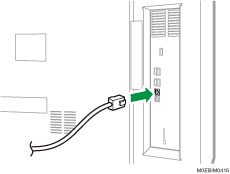
 Connect the other end of the LAN cable to a network connection device such as a hub or router.
 Turn on the power of the machine and confirm that the Ethernet interface LED lights up properly.
 | When the machine is connected to the network with 2500BASE-T, upper LED lights up in green, lower LED lights up in yellow. |
 | When the machine is connected to the network with 1000BASE-T, upper LED lights up in orange, lower LED lights up in yellow. |
 | When the machine is connected to the network with 10BASE-T/100BASE-TX, lower LED lights up in yellow. |