


Creating a Backup of/Restoring the Setting Information
You can create a backup of the setting information of the machine and UI server, and restore it a later time.
When operating the control panel of the machine, you can store the backup data on a USB memory device that is attached to the USB host interface on the control panel. When you are operating from a client computer, you can save the setting information in any folder on the client computer.
The following information can be backed up/restored.
Machine Setting Information: Information on the settings of the machine, settings information including the network settings, and device information including the machine ID
(counter information, information about adjustments, logs, and displayed data not included)
UI Server Setting Information: Setting Information for Displaying Various Contents on the Control Panel
(device specific information, logs, and displayed data not included)
Paper Information: Paper type, thickness, and information of other paper properties, adjustment data of the main unit of the machine, device information including the machine ID, and other information
 When creating a backup/restoring data on the USB memory device that is attached to the control panel of the machine, insert the USB memory device into its USB host interface on the control panel.
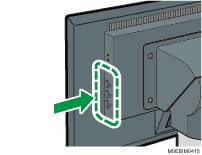
 Login to the machine using a user account with a role that can create/restore a backup.
 Press [
 ].
].
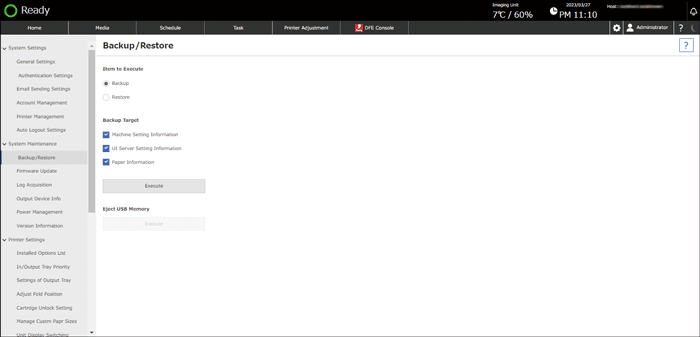
 Press [Backup/Restore] in [System Maintenance].
Creating a Backup
Specify [Backup] and specify the items with which to create a backup in "Backup Target".
Select from Machine Setting Information, UI Server Setting Information, and Paper Information. You can select more than one item.
Press [Execute].
Specify the destination folder to which to store the backup data.
Backup target and file name Backup target
File name at the time of backup
Machine Setting Information
(Machine Serial Number)_Engine_(timestamp at the time of acquisition).bkup
UI Server Setting Information
(Machine Serial Number)_UI_(timestamp at the time of acquisition).bkup
Paper Information
(Machine Serial Number)_paper_(timestamp at the time of acquisition).bkup
Restoring the Data
Specify [Restore] and press [Execute].
Press [OK] and specify the backup file to restore.
 When a message prompting you to restart the machine is displayed, restart the machine following the instructions that are displayed.