


Specifying the Method to Authenticate a User Account
Two types of authentication methods are available on the machine: Local Authentication, which uses the user accounts registered on the UI server, and Remote Authentication, which uses the LDAP server. Select either method according to the environment where the machine is used.
Authentication Method
Authentication Method | Description |
|---|---|
Local Authentication | The user is authenticated based on the user information registered on the UI server. |
Remote Authentication | The user is authenticated based on the user information registered on the LDAP server or in the Active Directory that is assigned to the role register on the UI server. |
Specifying the Authentication Method
Specify the method of authentication. When specifying Remote Authentication, also specify the authentication server.
 Log in to the machine using a user account with a role that can change the authentication method.
 Press [
 ].
].
 Press [Authentication Settings] in [System Settings].
 Specify the Authentication Method.
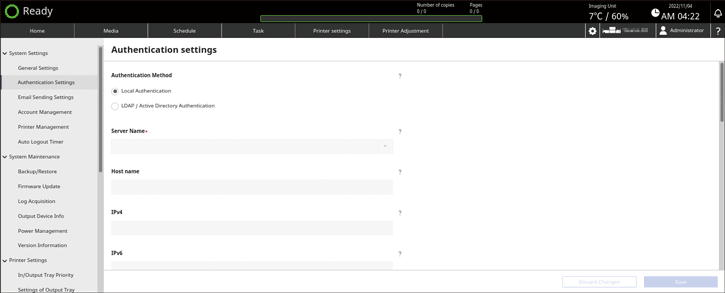
Local Authentication: Select this when authenticating a user with the user information registered on the UI server.
LDAP / Active Directory Authentication: Select this when authenticating a user with the user information registered on the LDAP or Active Directory server.
If you selected Local Authentication, press [Save] to finish configuration.
If you selected LDAP/ Active Directory Authentication, proceed to the next step.
 Upon selecting [LDAP / Active Directory Authentication], specify the LDAP/Active Directory server to use for authentication.
Server Name: Specify the LDAP/Active Directory server (Host name, IPv4 address, or IPv6 address) to use for authentication, and enter its details.
Host name: Enter the name using up to 256 alphanumeric characters (a–z, A–Z, and 0–9), and symbols (0x21–0x7e).
IPv4: Enter the address using numbers (0–9) and periods ".".
IPv6: Enter the address using alphanumeric characters (a-f, 0-9, colons ":"). The name and address are not case sensitive.
Port: Enter the port number to use for authentication. The default is "389".
Use Secure Connection: Specify whether to encrypt data when connecting to the server. When a user name is specified in "Directory Reader Account", the data is encrypted regardless of this setting. The default is [No].
Follow Referrals: Specify whether to track referrals when the server responded that the requested directory is on a different server. The default is [No].
Directory Reader Account: Specify the account to use for obtaining the directory information.
User Name: Enter the name using up to 128 characters in UTF-8 (however, spaces (single- or double-byte) are not allowed).
Password: Enter the name using up to 128 alphanumeric characters (a–z, A–Z, and 0–9), and symbols (0x21–0x7e).
Domain Name: Enter the name using up to 256 alphanumeric characters (a–z, A–Z, and 0–9), and symbols (0x21–0x7e). NTLM or Kerberos authentication is applied automatically when you specify a domain name. Leave blank to apply simple authentication.
Base DN: Enter the basic search string (DN) to use for authentication using up to 256 characters.
LDAP Filter: Specify the LDAP search filter to exclude accounts that are not to be used as the login account using up to 256 characters.
Login Name Attribute: Enter the attribute name that corresponds to the login name among the attributes of LDAP entries using up to 256 characters.
 Press [Save].