


Notes on Usage of the Machine

- Avoid taking the following actions close to or inside this machine because doing so can result in fire or electric shock:
Using flammable sprays, solvents, and so on
Placing flammable sprays, solvents, and so on
Placing containers holding liquids or small metal objects

- Do not obstruct the machine's vents. Doing so can result in fire as the internal components are overheated.
- When disconnecting the power cord from the wall outlet, make sure to pull the plug, not the cord. Do not pull the power cord forcibly. Doing so can damage the power cord, possibly resulting in fire or electric shock.
- If you do not use the machine for a long period of time such as consecutive holidays, be sure to disconnect the power cord plug from the wall outlet for reasons of safety.

Turn off the main power switch before unplugging the power cord.
The area around the vents might feel warm. This is caused by exhaust air and is not a malfunction.
A change in temperature may cause dew condensation to occur inside the machine. If condensation occurs, leave the machine be for more than two hours and allow it to adapt to the environment before use. Also, use the anti-humidity heater to prevent condensation from occurring.
Do not turn off the power of the machine while a process is in progress. Before turning off the machine, check that all operations and processes are completed.
Do not open the covers or paper source tray while a process is in progress. A paper jam may occur.
Do not move or tilt the machine while the power is on, and do not expose the machine to vibration.
Do not knock the machine while it is operating (for instance, do not use the machine's surfaces to knock stacks of paper into square).
Depending on the ambient temperature and humidity, steam may come from the vents at the rear right side of the machine during printing. This is water vapor from the paper, not a sign of malfunction.
The anti-humidity heater warms the machine's interior to maintain the proper humidity. This heater keeps the machine warm even if the main power switch is turned off.
Ventilation
When you use this machine in a confined space without good ventilation for a long time or print large quantities, you might detect an odd smell.
This might cause the output paper to also have an odd smell.
When you detect an odd smell, regularly ventilate in order to keep the workplace comfortable.
Set up the machine so that it does not directly ventilate towards people.
Ventilation should be more than 3 times/hr/person.
New machine smell
When a machine is new, it might have a unique smell. This smell will subside in about one week.
When you detect an odd smell, sufficiently ventilate and circulate the air in the room.
AC power switch
If the machine is not used for several days or longer at a time, set the AC power switch inside the left front cover of the main unit to "Stand by". Make sure that the main power switch is turned off and the main power indicator goes out before turning off the AC power switch. Not doing so may damage the solid state drive.
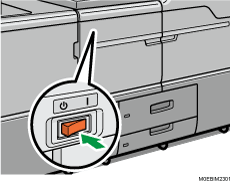
The anti-humidity heater works even after the AC power switch is turned off as long as the power cord is connected.
In normal operation, keep the AC power switch in the "On" position.
When you set the AC power switch to "Stand by", do not immediately set it to "On". After setting the switch to "Stand by", wait one minute or more before setting it to "On".