


Cleaning the Machine

- When performing maintenance on the machine, always disconnect the power cord from the wall outlet.
- Contact your sales or service representative for cleaning the machine's interior. If the machine's interior is not regularly cleaned while dust accumulates, fire and malfunction can result.

Do not use chemicals such as cleaning liquid and organic solvents such as paint thinner and benzene for cleaning. It may seep inside the machine through the gaps or melt the plastic material composing the exterior cover, causing malfunctions to occur.
Your local dealer will replace the ozone and dustproof filters as needed.
Do not clean parts other than those explicitly specified in this manual. Other parts should only be cleaned by your local dealer.
Cleaning the Power Cord Plug
For safety, clean the power plug at least once a year.
Use a dry cloth to wipe any dust from the plug.
Turn off the main power switch before unplugging the power cord.

After cleaning the power cord plug, make sure that the power cord is connected to the machine firmly, and then connect the plug to the wall outlet.

- To prevent fire or electric shock, disconnect the plug and the power cord from the wall outlet at least once a year and check them. If any of the following conditions exist, do not use the plug and the power cord continuously, and consult your dealer or service representative.
There are burn marks on the plug
The prongs on the plug are deformed
The power cord's inner wires are exposed or broken
The power cord's coating is cracked, dented, or damaged
When the power cord is bent, the power turns off and on
Part of the power cord becomes hot
- Be sure to disconnect the plug from the wall outlet and clean the prongs and the area around the prongs at least once a year. Allowing dust to build up on the plug constitutes a fire hazard.
Cleaning the Line Sensor
When the “Contact Image Sensor(s) in the detection unit is dirty.” message appears, clean the line sensor.
 Open the front cover.
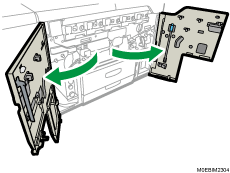
 Lower the C1 lever, and pull out the fusing section toward you.
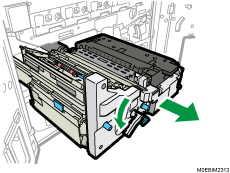
 Lower the D3 handle.
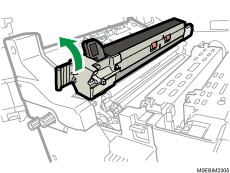
 Clean the Contact Glass using the cloth provided with the machine.
Wipe the glass in one direction from its back end toward the front, leaving no uncleaned parts.
Be careful not to touch the Contact Glass with your bare hands.
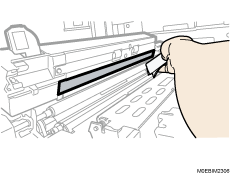
 Rotate the roller unit so that the white surface between the black rollers is exposed entirely, and wipe the white surface.
Wipe the surface in one direction from its back end toward the front, leaving no uncleaned parts.
Be careful not to touch the Contact Glass directly with your bare hands.
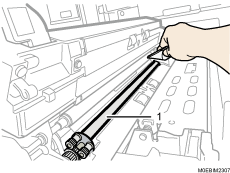
White surface
 Push the fusing section toward the inside of the machine, and then raise the C1 lever.
 Close the front cover.
Cleaning the Paper Dust Collector
Clean the paper dust collector when the pop-up animation with cleaning instructions appears.
Open the right front cover.
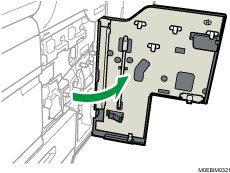
Lower the B5 lever, and pull out the right drawer unit toward you.
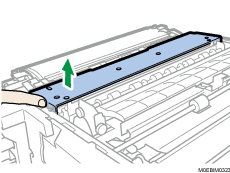
Press the hook at the front with your finger, and lift up the cover to remove it.
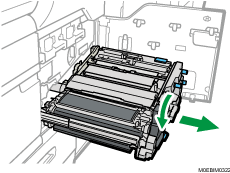
Push and turn the lever on the paper dust collector clockwise, and remove it from the machine.
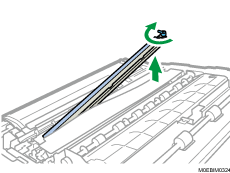
Remove paper dust from the paper dust collector.
Aligning the pins on the right and left sides of the paper dust collector with the holes on the drawer unit, attach the case back in its original position, and turn the lever counterclockwise to secure it.
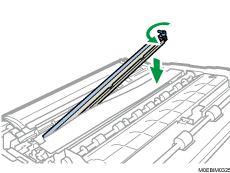
Attach the cover.
 Push the right drawer unit toward the inside of the machine, and then raise the B5 lever.
 Close the right front cover.
Cleaning the CIS Glass
Clean the CIS glass when the pop-up animation with cleaning instructions appears.
Open the right front cover.
Remove the cleaning brush on the backside of the right front cover.
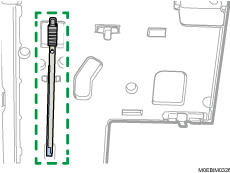
Insert the cleaning brush until it stops in the hole on the inner cover, and then pull the brush toward you. Repeat this action three times.
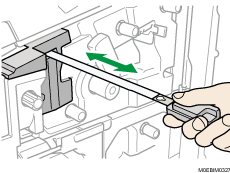
When you are finished cleaning, put the cleaning brush back into its original position.
Close the right front cover.
Cleaning Contact Image Sensor Back Plate
Clean the contact image sensor back plate when the pop-up animation with cleaning instructions appears.
Open the right front cover.
Push the upper part of the inner cover to the left, and pull the cover toward you to remove it.
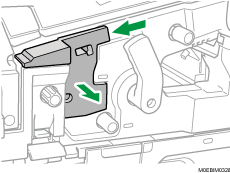
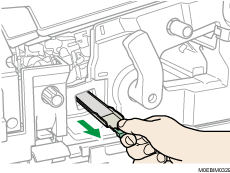
Pull contact image sensor back plate out of the machine.
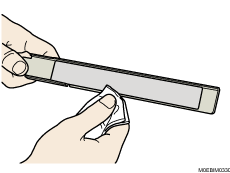
Using the optical cleaning cloth, wipe the paper dust off contact image sensor back plate.
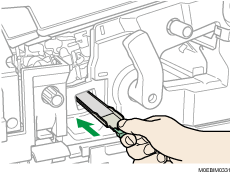
Insert contact image sensor back plate back into the machine.
Attach the inner cover.
Close the right front cover.