Interrupting a Print Job in Progress to Print Another Job
You can configure the machine to interrupt a print job in progress at any time while performing a job of a specific function, e.g. interrupting a job of the Copy function job to print another printer function job.
-
Printing of the same function is performed in the order of the jobs.
-
When printing of the interrupting function finishes, the interrupted print job resumes automatically.
Use the following procedure to specify the function that has priority:
-
Press [Settings] on the Home screen.
-
Press [System Settings].

-
Press [Machine]
 [Print Action/Image Quality Adjustment], and then press [Interleave Print Priority].
-
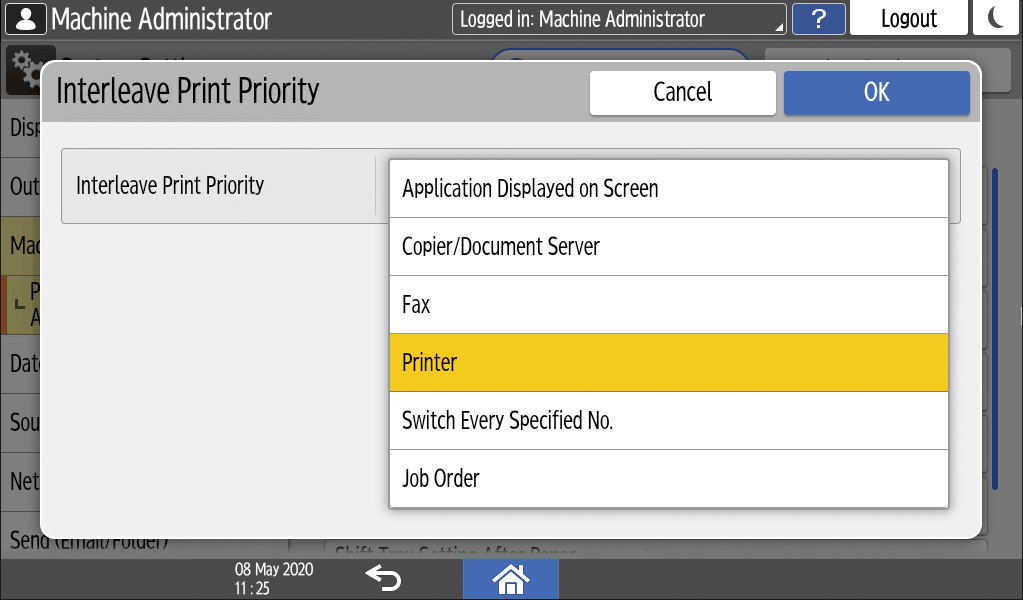
Select the function that has priority for printing.
-
Application Displayed on Screen: Printing displayed on the screen has priority.
-
Copier/Document Server, Fax, Printer: The priority is given to the specified function. After that, the priority is given in the order of Fax, Printer, and Copier / Document Server.
-
Switch Every Specified No.: When the machine is instructed to perform printing of multiple functions at the same time, the machine switches the function to perform printing every 5 sheets.
-
Job Order: Printing is performed in the order of the jobs. However, the fax function is given highest priority.
-
-
Press [OK].
-
After completing the procedure, press [Home] (
 ).