



 Previous
 Log in as the machine administrator.
 Press [User Tools] (
 ) on the Home screen.
 Press [Screen Features].
 Press [Screen Device Settings].
 Press [Application Authentication Settings].
 Press [General Settings for Application Authentication].
 Select [Require Auth./All Users Have Privileges] or [Require Auth./No Users Have Privileges] for each application, and then press [OK].
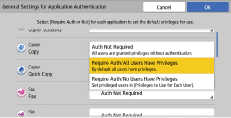
Require Auth./All Users Have Privileges
Requires application authentication. All users registered in the Address Book can use the application by default.
Require Auth./No Users Have Privileges
Requires application authentication. All users registered in the Address Book cannot use the application by default.


