



 Previous
This section describes the output tray settings.
Depending on the options installed on the machine, some trays might not be displayed.
When the internal tray 2 is installed, [Internal Tray 2] is displayed.
When Finisher SR3130 is installed, [Finisher Shift Tray] is displayed.
If you select a setting that uses the finisher, the job might not be delivered to the specified output tray.
If you select stapling or punching, the job will be delivered to the finisher shift tray.
If you select shift-sorting, the job will be delivered to the finisher shift tray.
You cannot interrupt the current stapling job even if a stapling job is specified by a different function.
When you make copies using the Quick Copy function and if the finisher is specified as the paper output, copies are delivered only to the shift tray of the finisher. You cannot change the output tray setting.
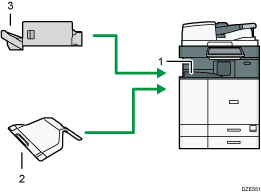
Internal Tray 1
Internal Tray 2
Finisher Shift Tray


