




 Previous
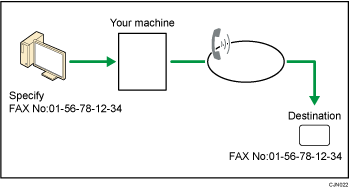
You can send a document created with a Windows application from a computer connected to the machine to another fax machine.
Connect computers to the machine via parallel port, LAN, wireless LAN, or USB 2.0.
To send a fax, simply select [Print...] from the Windows application, then select LAN-Fax as the printer, and then specify a destination. LAN-Fax enables paperless faxing from your computer to the other destinations.
In addition to sending faxes, the LAN-Fax Driver allows this machine to be used for printing out documents prepared on a computer for proof checking.
To use the LAN-Fax Driver, connect this machine to computers and make the necessary network settings, and then install the LAN-Fax Driver and the related utilities on your computer.

Errors occurring when the machine is used as a LAN-Fax will not be displayed on the computer. Check for errors by using Web Image Monitor. See Web Image Monitor Help.

It is recommended that you use Web Image Monitor running under the same network environment as this machine. Otherwise, the web browser may not open and an error may occur.


