




 Previous
When printing on carbonless paper of weight less than 64g/m2, set the Z-fold support tray that is provided with the finisher on the finisher shift tray.
 Press the [Suspend/Resume] key that is located on the left side of Finisher SR5050 or Booklet Finisher SR5060.
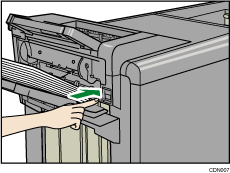
 Remove the paper that has been ejected to the finisher shift tray.
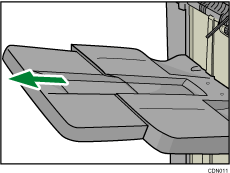
 Pull out the extension tray on the finisher shift tray.
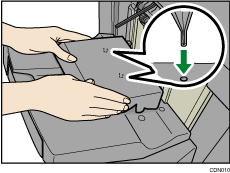
 Attach the Z-fold support tray by inserting the protrusions on its underside into the holes on the finisher shift tray.
 Press the [Suspend/Resume] key to resume printing.

Depending on the brand of the paper being used, the paper may be ejected normally even when the Z-fold support tray is not attached.
When the Z-fold support tray is attached, output sheets may not be stacked neatly.


