



 Previous
Copies two 1-sided pages or one 2-sided page onto a 2-sided page. During copying, the image is shifted to allow for the binding margin.
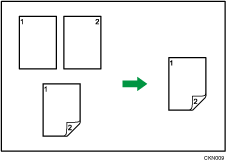
There are two types of Duplex.
1 Sided  2 Sided
Copies two 1-sided pages on one 2-sided page.
2 Sided 2 Sided
Copies one 2-sided page on one 2-sided page.
The resulting copy image will differ according to the orientation in which you place your originals ( or
or  ).
).
Original orientation and completed copies
To copy on both sides of the paper, select the original and copy orientation according to how you want the printout to appear.
Original | Placing originals | Original Orientation | Orientation | Copy |
|---|---|---|---|---|
|
|
| Top to Top |
|
|
|
| Top to Bottom |
|
|
|
| Top to Top |
|
|
|
| Top to Bottom |
|





 When Using the Copy Application

About how to use the application's screen, see "[Copy] Screen".
 When Using the Copier (Classic) Application
For details about how to use the Classic Copier function, see Procedure for Duplex Copying (Classic).

