


 Previous
Specify how to rotate images in the print data on which post-processing is specified in reference to the pixel orientation. The position of an area on which post-processing is applied changes in regard to the orientation of the image after it has been rotated.
Settings
None
90 Degrees Clockwise
180 degrees
90 Degrees Counterclockwise
Default: None
When "Left" is selected for post-processing:
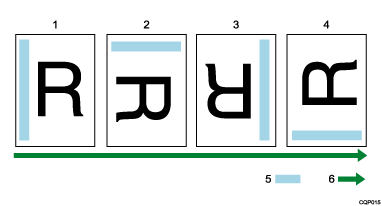
None
90 Degrees Clockwise
180 degrees
90 Degrees Counterclockwise
Position of post-processing
Pixel orientation
Operations
If "None" is selected, post-processing is applied to the image data assuming that the image orientation is the same as the pixel orientation.
If "90 Degrees Clockwise" is selected, post-processing is applied to the image data assuming that the image orientation is rotated by 90 degrees from the pixel orientation.
If "180 degrees" is selected, post-processing is applied to the image data assuming that the image orientation is rotated by 180 degrees from the pixel orientation.
If "90 Degrees Counterclockwise" is selected, post-processing is applied to the image data assuming that the image orientation is rotated by 270 degrees from the pixel orientation.

If the "orientation" printing option is specified, the "Z. Rotate Image (Pixel Orientation)" setting is ignored.


