




 Previous
The machine selects a suitable size of copy paper automatically based on the detected original size and the reproduction ratio you select.
Original sizes and orientations that can be used with Auto Paper Select are as follows (when copied at a ratio of 100%):
 (mainly Europe and Asia)
Original location |
Original size and orientation |
|---|---|
Exposure glass |
A4 |
ADF |
A3 |
 , B5 JIS
 , B4 JIS
 (mainly North America)
Original location |
Original size and orientation |
|---|---|
Exposure glass |
81/2 × 11 |
ADF |
11 × 17 |
 When Using the Copy Application
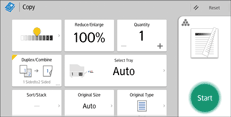
About how to use the application's screen, see "[Copy] Screen", Getting Started.
 When Using the Copier (Classic) Application
For details about how to use the Classic Copier function, see Procedure for Auto Paper Select (Classic).


