


 Previous
Originals are ejected onto the original stacker.
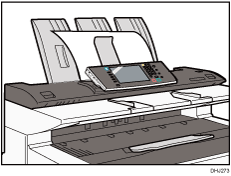

If the original is larger than A1(D)
 , select original rear output. For an original larger than A1, use the rear original exit. When delivering an original longer than A1 to the original upper output stacker, hold the end of the delivered original so that it does not enter the original table.
Do not open the scanner cover while the original is in the upper output stacker.
If the original is heavier than 157 g/m2 (41.8 lb.), select original rear output.
If the original is plain paper not heavier than 52.3 g/m2 (13.9 lb.) or translucent paper not heavier than 80 g/m2 (21.3 lb.), select original rear output.
Non-standard, wavy, or curled (R=50 mm or above, h=20 mm or below) originals cannot be used.
After delivering the original to the upper output stacker, move it away by holding its end instead of leaving it on the stacker before the next original is delivered.
Remove delivered paper occasionally. You cannot stack 50 sheets of plain paper or 10 sheets of translucent paper.
At high temperature or humidity or when paper is fed in the cross-grain direction, less than 50 sheets of plain paper can be stacked. If this happens, flatten curled originals by hand. Do not stack paper larger than A1.


