


 Previous
This section describes how the list of stored files is displayed.
To display the list of stored files, press [Select/Manage Stored File] under [Send Settings].
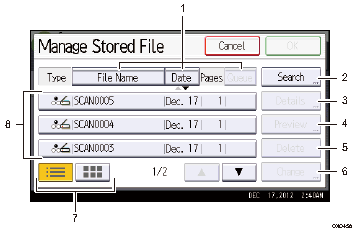
Keys for sorting files
Press to sort the files using the selected item. Select the same item once more for a reverse sort. However, the files cannot be sorted in reverse delivery.
[Search]
Press to switch to the screens for searching for a file by user name or file name, or to the screen for displaying all files.
[Details]
Press this to display details about the selected file.
[Preview]
Press this to display a preview of the selected file. For details, see "Checking Stored Files Selected from the List", Scan.
[Delete]
Press to delete stored files.
[Change]
Press to change the file data.
List/ thumbnails
You can select whether to display stored files as a list or as thumbnails.
List of stored files
Displays the list of stored files.
If the file you want to select is not displayed in the list, press [
 ] or [
 ] to scroll the screen. If a password has been specified for a file, a key icon appears to the left of the icon that indicates the color mode.

Depending on the security setting, some files may not appear in the list.
Files stored under functions other than the scanner function do not appear on this screen.


